Working With Sprites
Sprite definitions let you name a selection of tiles from a sprite sheet and draw them later by name. They work with rectangle selections and tile grids (for reusing tiles across a larger object).
Example: 4x3 walk cycle sheet
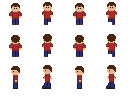
This sheet is 128x96 px, arranged as 4x3 animation frames. Each frame is 32x32, and we load the sheet as 16x16 tiles. That means each animation frame occupies a 2x2 block in the tile grid.
Because the tile grid is 8x6, using a 1x2 rect would only grab the left half of a frame.
Use the full 2x2 tile block for each animation frame:
| Frame | Tile ids | Grid rect |
|---|---|---|
down_0 | [[0, 1], [8, 9]] | [0, 0] -> [1, 1] |
down_1 | [[2, 3], [10, 11]] | [2, 0] -> [3, 1] |
down_2 | [[4, 5], [12, 13]] | [4, 0] -> [5, 1] |
down_3 | [[6, 7], [14, 15]] | [6, 0] -> [7, 1] |
up_0 | [[16, 17], [24, 25]] | [0, 2] -> [1, 3] |
left_0 | [[32, 33], [40, 41]] | [0, 4] -> [1, 5] |
Right is the same as the left row mirrored horizontally.
Both approaches are valid and supported by Sliver.
Defining sprites in code
Use SpriteLibrary to define by rectangle (grid coordinates) or by index grid. Rects are top-left to bottom-right, inclusive. Tile ids count left-to-right, top-to-bottom across the sheet, as shown above.
import { GameObject, Vector, renderSpriteAnimation } from "sliver-engine";

await sprites.loadSpriteSheet(
  "human", // name of the spritesheet
  new URL("/img/human.png", window.location.href),
  16,
  16
);

// Defining a sprite as a rect in the spritesheet
sprites.defineSpriteFromSheet(
  "human_down_0", // sprite name
  "human", // spritesheet name
  new Vector(0, 0), // [col, row] top-left
  new Vector(1, 1) // [col, row] bottom-right (2x2 tiles)
);

// Defining a sprite as a 2D array of tile ids
sprites.defineSpriteFromSheetIndexes("human_down_1", "human", [
  [2, 3],
  [10, 11],
]);

// Another definition by tile ids
sprites.defineSpriteFromSheetIndexes("human_down_2", "human", [
  [4, 5],
  [12, 13],
]);

sprites.defineSpriteFromSheet(
  "human_down_3",
  "human",
  new Vector(6, 0),
  new Vector(7, 1)
);

const WALK_DOWN = [
  "human_down_0",
  "human_down_1",
  "human_down_2",
  "human_down_3",
];

class Hero extends GameObject {
  @renderSpriteAnimation(WALK_DOWN, { ticksPerFrame: 6, scale: 2 })
  override render(): void {}
}
To walk right, reuse the left animation and mirror horizontally:
// define all the frames like you did with walking down

class Hero extends GameObject {
  @renderSpriteAnimation(WALK_LEFT, {
    ticksPerFrame: 6,
    scale: 2,
    mirroring: "horizontal",
  })
  override render(): void {}
}
JSON manifest (hybrid addressing)
You can define sprites in JSON and load them in bulk. Each sprite chooses how tiles are addressed:
mode: "grid"uses[col, row]points.mode: "id"uses flat tile ids (left-to-right, top-to-bottom).
{
  "sprites": {
    "human_down_0": {
      "sheet": "human",
      "rect": { "mode": "grid", "from": [0, 0], "to": [1, 1] }
    },
    "human_down_1": {
      "sheet": "human",
      "rect": { "mode": "id", "from": 2, "to": 11 }
    },
    "human_up_0": {
      "sheet": "human",
      "rect": { "mode": "grid", "from": [0, 2], "to": [1, 3] }
    },
    "human_left_0": {
      "sheet": "human",
      "rect": { "mode": "grid", "from": [0, 4], "to": [1, 5] }
    },
    "human_down_2": {
      "sheet": "human",
      "grid": {
        "mode": "id",
        "tiles": [[4, 5], [12, 13]]
      }
    }
  }
}
Load it at startup:
import spriteManifest from "./Assets/human.json";

const sprites = canvas.getSpriteLibrary();
sprites.loadSpriteDefinitions(spriteManifest);
Rendering definitions
Use the decorator (preferred) or call drawSpriteDefinition directly (discouraged)
import { GameObject, renderSprite } from "sliver-engine";

class Hero extends GameObject {
  @renderSprite("human_down_0", { scale: 2 })
  override render(): void {}
}
sprites.drawSpriteDefinition(
  canvas.getContext(),
  "human_down_0",
  new Vector(120, 80),
  2
);
Animation definitions
@renderSpriteAnimation accepts an array of sprite definition names:
@renderSpriteAnimation(["human_down_0", "human_down_1"], {
  ticksPerFrame: 6,
  scale: 4,
})
override render(): void {}
Interactive example
This sandbox demonstrates the full sprite workflow in a compact setup:
- loads the same
human.pngsprite sheet used in this page (embedded as base64 so it works in Sandpack) - defines sprite names with
defineSpriteFromSheet(...)using2x2tile rects - animates the hero using
@renderSpriteAnimation(...) - uses up/down/left frame sets from the table and mirrors left frames for right movement
Try this:
- Edit
spriteSetup.tsto change frame definitions. - Edit
SpriteHero.tsto change controls, animation speed, or frame lists. - Press Run to apply changes.
import { Vector } from "sliver-engine";
import type { CanvasController } from "sliver-engine";
import { HUMAN_SHEET_DATA_URL } from "./humanSheetData";

const HUMAN_SHEET_URL = new URL(HUMAN_SHEET_DATA_URL);
const HERO_SHEET_NAME = "demo:hero";

type SpriteRectDefinition = readonly [
	name: string,
	fromCol: number,
	fromRow: number,
	toCol: number,
	toRow: number,
];

const HERO_FRAME_DEFINITIONS: readonly SpriteRectDefinition[] = [
	["hero_down_0", 0, 0, 1, 1],
	["hero_down_1", 2, 0, 3, 1],
	["hero_down_2", 4, 0, 5, 1],
	["hero_down_3", 6, 0, 7, 1],
	["hero_up_0", 0, 2, 1, 3],
	["hero_up_1", 2, 2, 3, 3],
	["hero_up_2", 4, 2, 5, 3],
	["hero_up_3", 6, 2, 7, 3],
	["hero_left_0", 0, 4, 1, 5],
	["hero_left_1", 2, 4, 3, 5],
	["hero_left_2", 4, 4, 5, 5],
	["hero_left_3", 6, 4, 7, 5],
];

export const loadDemoHeroSprites = async (
	canvas: CanvasController,
): Promise<void> => {
	const sprites = canvas.getSpriteLibrary();

	await sprites.loadSpriteSheet(HERO_SHEET_NAME, HUMAN_SHEET_URL, 16, 16);

	for (const [name, fromCol, fromRow, toCol, toRow] of HERO_FRAME_DEFINITIONS) {
		sprites.defineSpriteFromSheet(
			name,
			HERO_SHEET_NAME,
			new Vector(fromCol, fromRow),
			new Vector(toCol, toRow),
		);
	}
};
Pre-baking behavior
Multi-tile index definitions are pre-baked into a bitmap the first time they are used. Single-tile definitions render directly.
Validation and errors
The manifest loader validates structure and throws with clear messages if:
- a sprite name is reused,
- the manifest is missing required fields,
rect/gridare invalid or both defined,- a referenced spritesheet is missing (for grid-based conversions).